Projects with structure.
Customers, quotes and invoices in a clear project hierarchy. With unique project and document numbers.
⌄ Bathroom renovationP-2026-042⌄ Quote AN-2026-042Invoice RE-2026-108
From the first quote to the final invoice: eFakturix helps you create quotes and invoices and manage projects, contacts and emails in one place. So you have more time for your actual work.
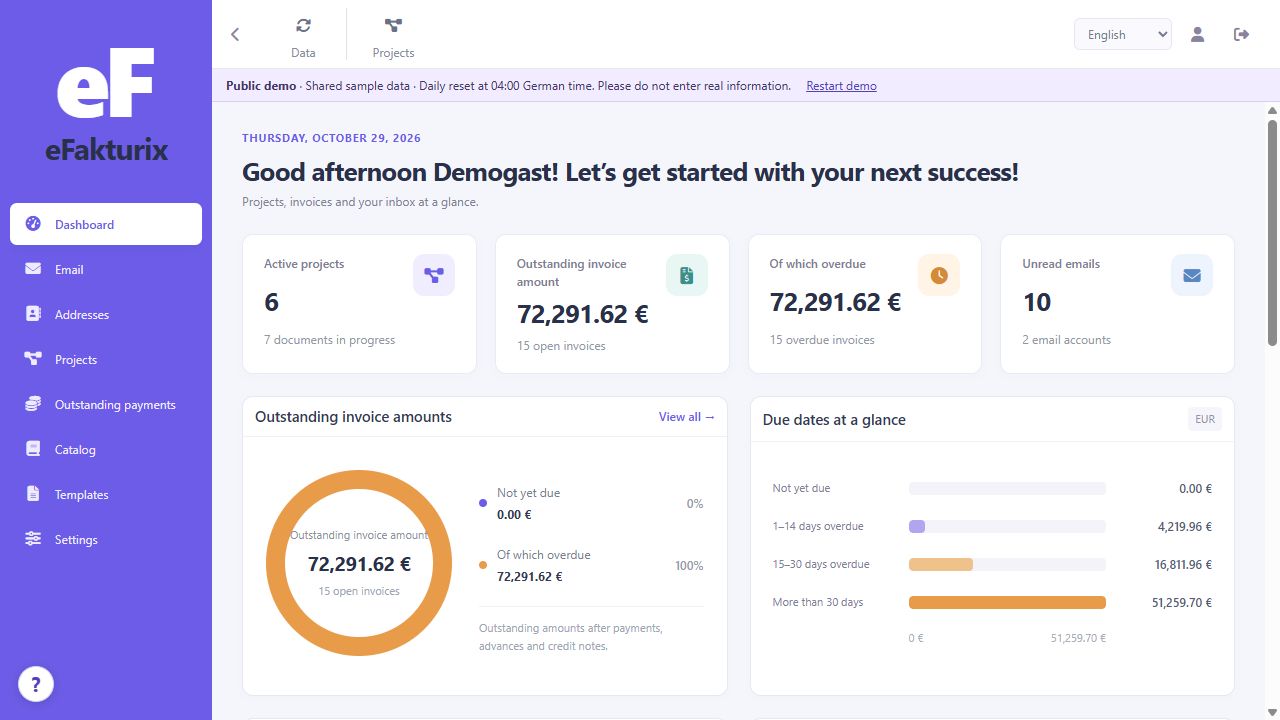
One customer, several documents and lots of small tasks. eFakturix keeps related information together, from contact details and line items to outstanding balances.
Customers, quotes and invoices in a clear project hierarchy. With unique project and document numbers.
Text, images, tables and clearly marked placeholders. Create your own templates with page margins, tab stops and customizable line-item columns.
Carry line items over from a quote, apply discounts and create partial or cumulative invoices. Invoiced amounts and received payments remain separately visible.
Item images, purchase prices and percentage markups: calculate your net selling price or set it yourself. Add multiple items with the quantities you need. Organize text snippets and document templates in folders.
Multiple IMAP/SMTP accounts, search and folders. Compose, reply and forward using the shared editor. With drafts, CC, multiple recipients, attachments and a separate signature for each account. Add or remove accounts in settings.
Export XRechnung in UBL or CII format. ZUGFeRD / Factur-X combines an invoice PDF with embedded XML data. View imported XRechnung documents, print documents and export PDFs.
From documents to electronic exchange ↗View contact details, projects, open invoices and recent payments together. Add custom fields such as a routing ID or extra phone numbers and use them as placeholders.
Manage users and groups and assign permissions for each area: view, create, edit, delete and export. Server-side checks protect your business workflows.
Archive documents together with their PDFs and data. Signed change records and integrity checks help trace modifications. A ZIP audit export bundles documents, business data and supporting records.
Start with the fictional business Werkraum. Add customers, prepare a quote or try the workflow through to invoicing, without installing anything or creating an account.
Open live demo ↗A fresh start every day.
At 04:00 German time, the demo is reset to its original state. All changes are discarded.
Record payments, check due dates and prepare reminders individually or in batches.
Exchange bills of quantities and import item data for your calculations.
Short hints explain the main areas. Cancel at any time or open them again using “?”.
Clear structure. Flexible details.
Explore the main views.
Active projects, open invoices, due dates and new emails. Go straight from the overview to the right place.
The information is already there.
Use it again in the next step.
Enter contact details, assign a project and start with a suitable default template.
Add catalog items, sub-items and text templates. Set quantities and discounts as needed.
Carry over your work and track payment balances. Review the document, print it or export it electronically.
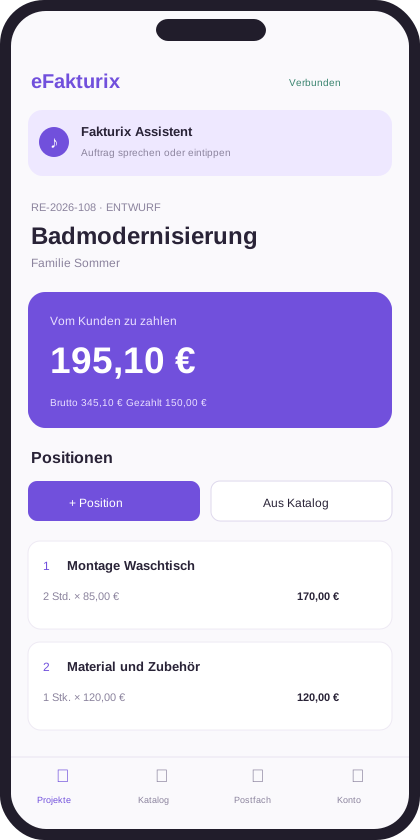
The Android app brings key features wherever you need them: to customers, construction sites or the workshop.
Prepare line-item requests and email drafts using your voice. AI processes requests on your own server. You review the result and confirm the action.
Example of a prepared request
The main answers before
you take a closer look.
For businesses and service providers that want to manage customer projects, quotes and invoices in one environment. Especially useful when materials, services and recurring text are part of the job.
Yes. The shared editor supports text, images, tables and placeholders. Organize templates by document type, set a default template and customize your line-item columns.
Yes. There are line-item and document discounts, optional items, and partial and cumulative invoices. Amounts already invoiced and payments actually received are shown separately. Manage payments, due dates and reminders in outstanding invoices.
Email features use IMAP for receiving and SMTP for sending. Enter the connection details in settings.
AI processing is designed for a local Ollama server. Speech is processed using Android’s local speech recognition. Supported hardware and an offline speech model are required; requests can also be typed.
Enter a net purchase price and a percentage markup in the catalog. A €100 purchase price with a 25% markup gives a €125 net selling price. Alternatively, set your selling price directly. Existing invoice line items retain their prices.
Business address, tax details, bank details, payment terms and numbering formats for each document type. Combine prefixes, dates and sequential numbers. Email templates also use the shared template editor.
Document finalization, archived original files, signed change logs, integrity checks and audit exports provide technical foundations. Full compliance with German GoBD requirements also depends on actual business procedures, retention and backups; no such certification is claimed here.
Yes. The live demo opens the actual application with fictional Werkraum sample data. Work freely with customers, projects and documents. The shared demo resets daily at 04:00 German time. Please do not enter real data.
A public pricing and purchasing model has not yet been finalized. This website shows the current features and gives a first impression. For questions, contact Benjamin Kosinski at B.Kosinski@eFakturix.de.
Get to know eFakturix and discover
how your workflows can fit together.